

TUI system monitor · Rust
Watch your system from your terminal.
xtop is a cross-platform TUI system monitor written in Rust: rendered with ratatui, measured with real sysinfo metrics, and built as a thin kernel around a modular ecosystem — widgets, layouts, plugins, extensions and effects. The project lives in the github.com/xtop-cli organization.
features
What xtop measures — and how it paints it
Real metrics, no fabricated data: when the hardware exposes no reading, the widget shows its honest empty state. Summary taken from docs/features.md.
CPU
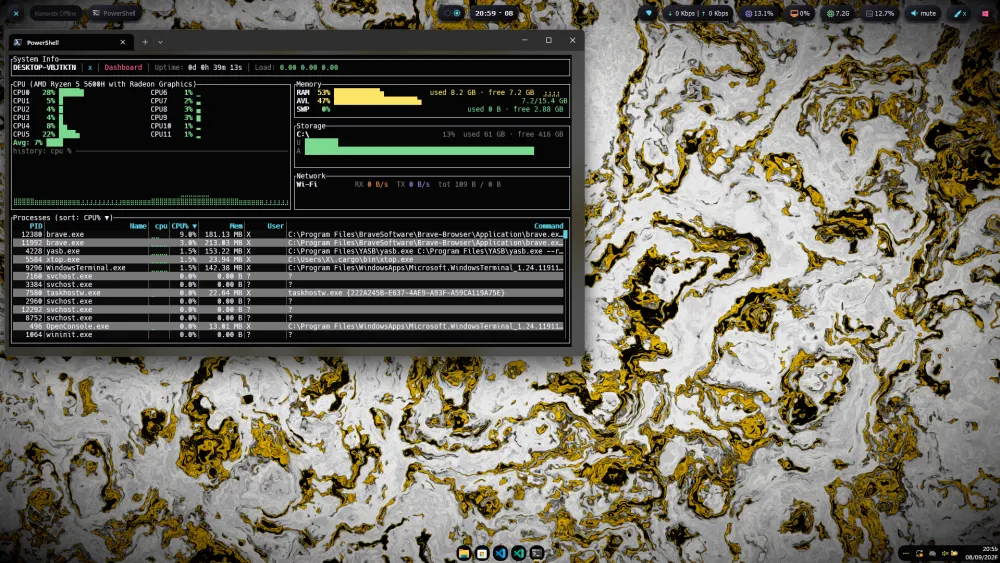
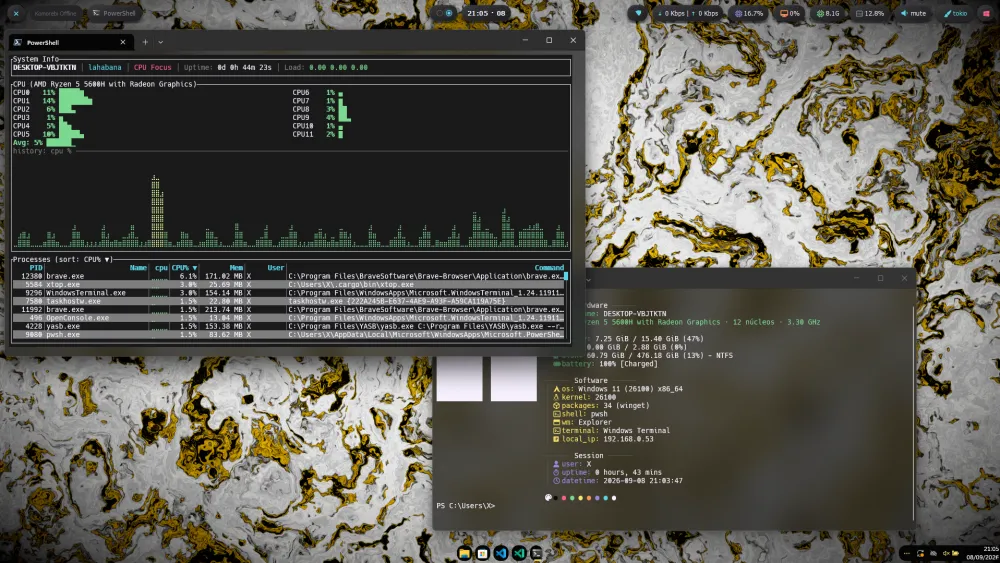
Usage per core and thread with horizontal gauges, max temperature from hardware sensors, and a historical chart.
Memory
RAM and Swap gauges with a historical line chart and a configurable history window.
Network
Real-time RX/TX tracking per interface, with totals and a dual-series chart.
Storage · Disk I/O
Usage gauges per mount point and read/write speeds per device, in bytes per second.
Processes
Live search, CPU/Mem/PID/Name sorting with direction marker, and PID-anchored selection.
GPU · Battery
GPU via nvidia-smi (NVIDIA, any OS) or sysfs on Linux; real battery probes on Linux, macOS and Windows.
Themes
12 themes with fixed per-slot roles, WCAG-normalized contrast, and instant cycling with t/T.
Layouts
7 modes + 3 Detail presets, recursive JSONC layouts, terminal-size degradation and full-screen.
Plugins & MCP
samurai exposes 12 JSON actions and 10 alert rules; the MCP server offers them as tools to AI agents.
Effects
Frame effects over the final buffer: a deterministic 500 ms fade-in, contracted in xtop-effect-api.
screenshots
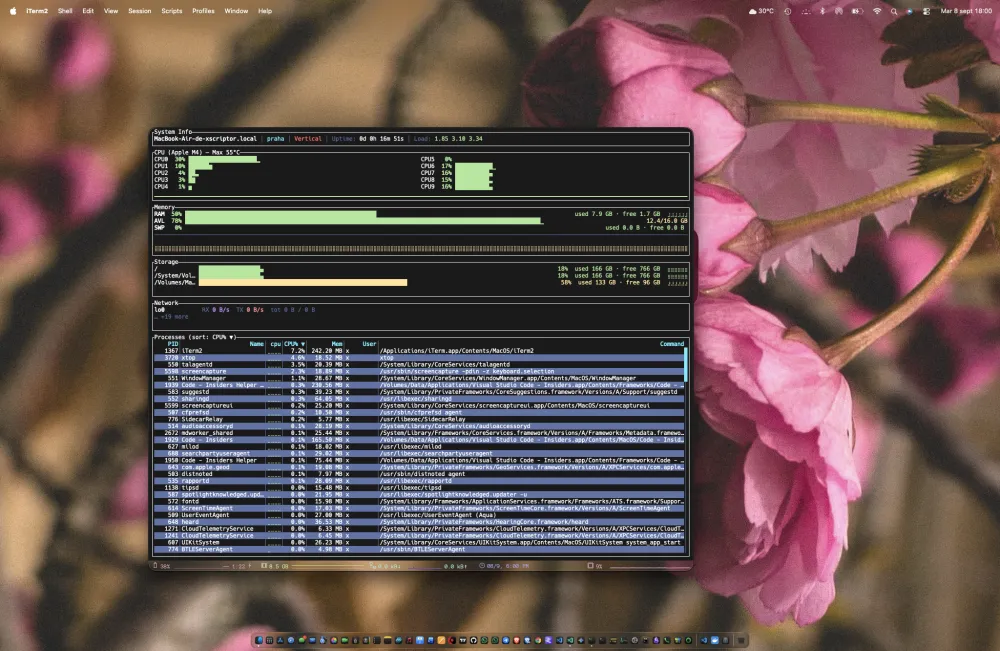
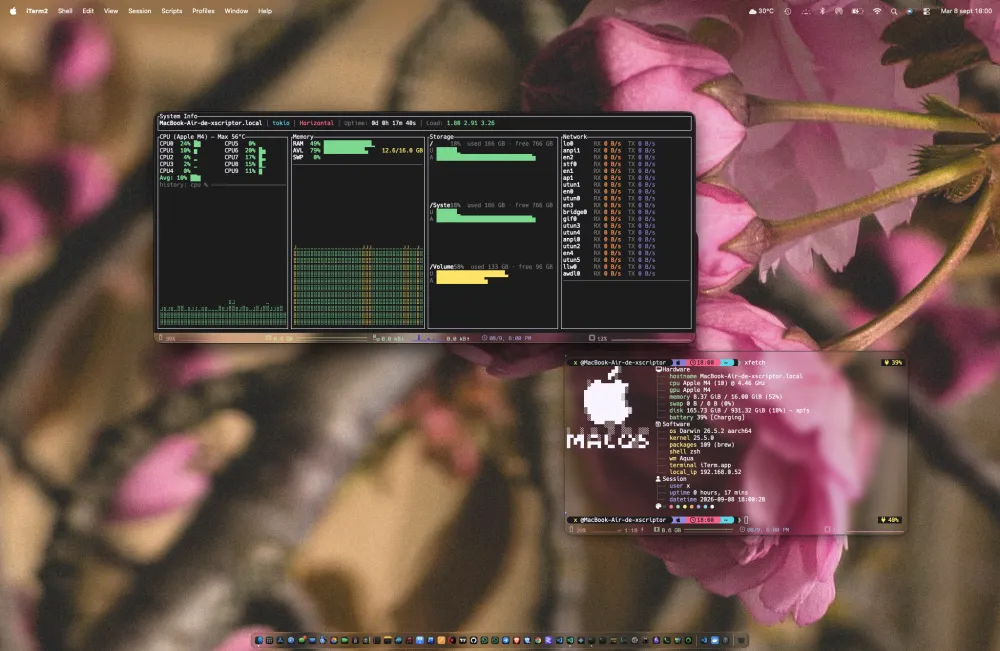
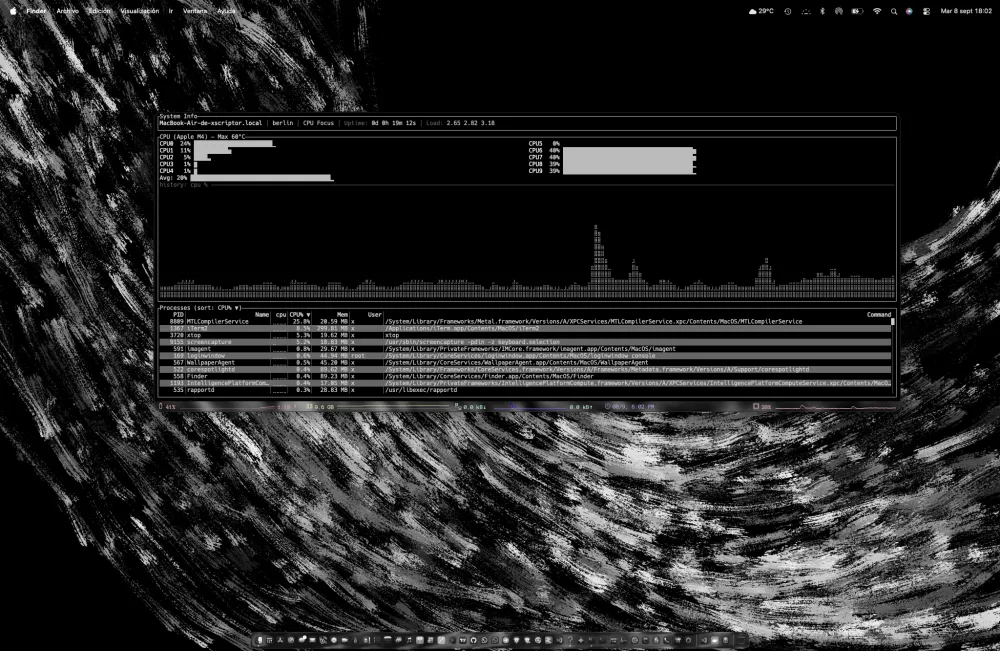
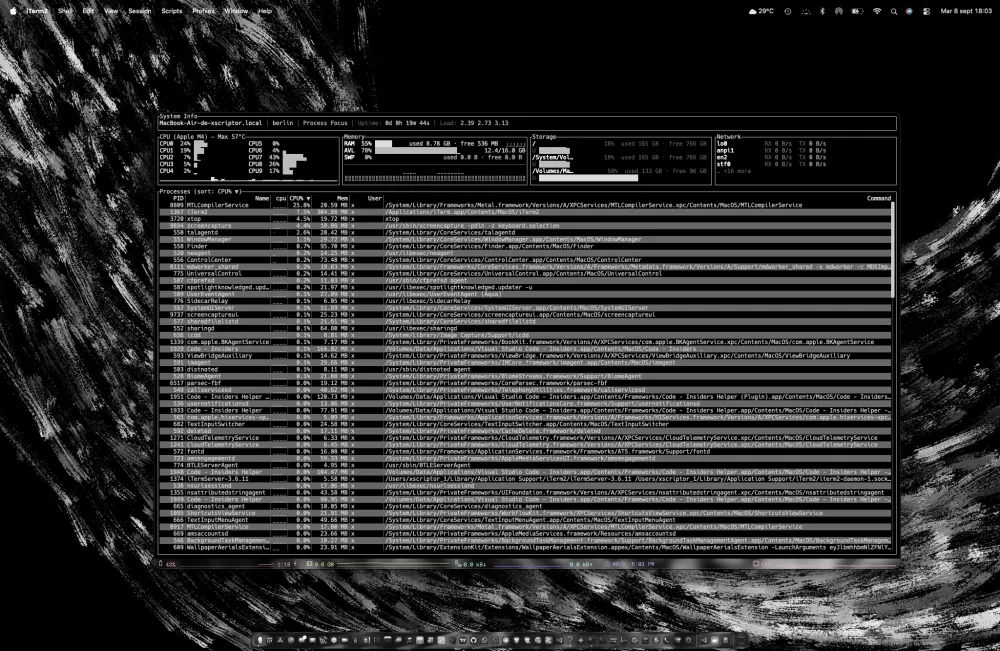
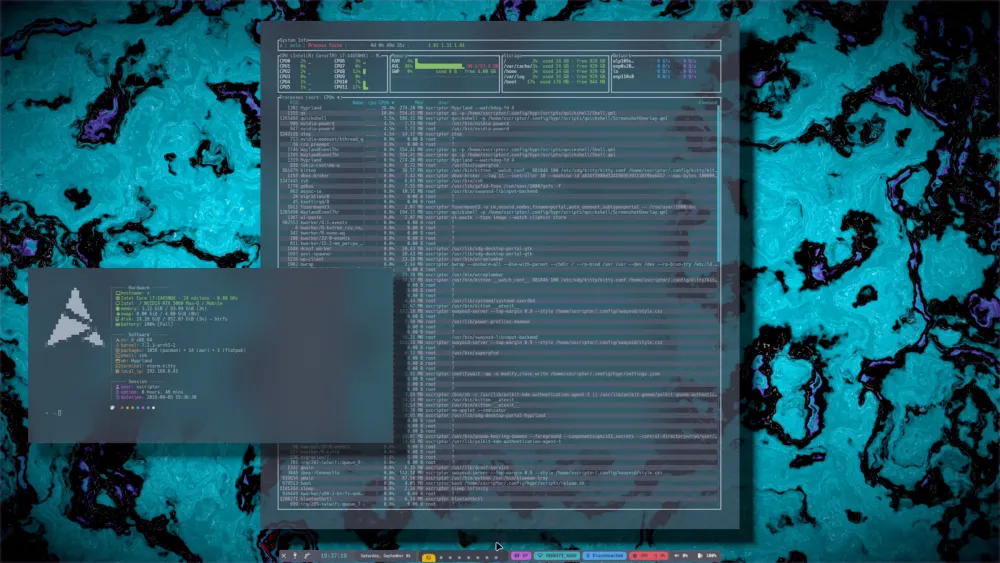
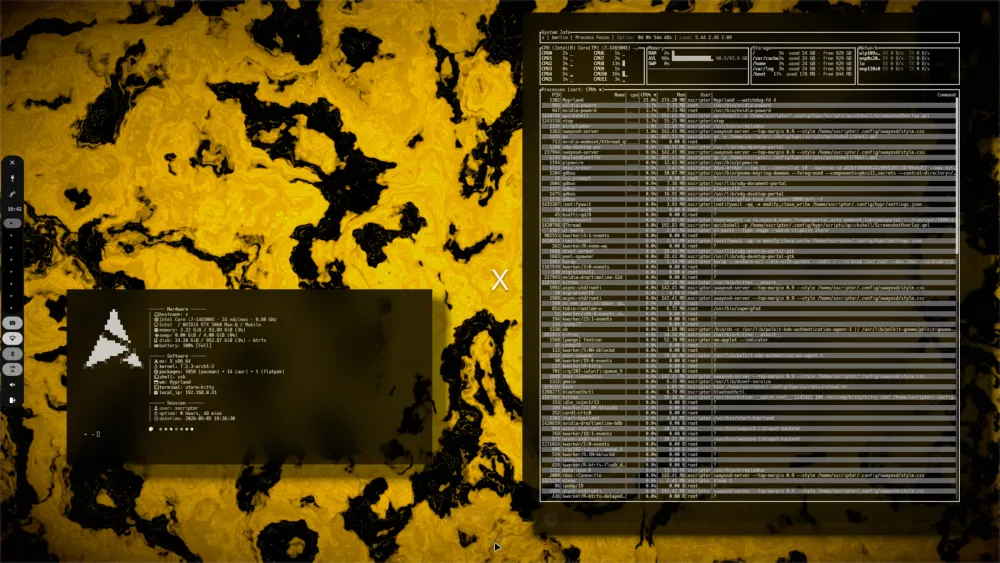
This is how it looks in a real terminal
Captures from the kernel repo (xtop/assets/previews). Every layout adapts to the terminal width and height, with a hard floor of 40×8.
colors
Twelve palettes, one role contract
Every theme is a background/foreground pair plus 16 slots with a fixed role (alert, good, warn, rx, tx, accent, dim, series). This site uses X in dark and Madrid in light, from xscriptor-colors/assets.
X
#050505 / #f7f1ff · this site: darkMadrid
#fafafa / #1a1a1a · this site: lightLahabana
#19191a / #f7f1ffMiami
#000000 / #f7f1ffParis
#1a0a30 / #f7f1ffTokio
#1c1c1d / #f7f1ffOslo
#3f4451 / #abb2bfHelsinki
#f8fafe / #544d40Berlin
#000000 / #ccccccLondon
#ffffff / #333333Praha
#1a1a1a / #ffffffBogota
#200b0a / #f7f1ffFull slot and role reference in docs/colors.md.
ecosystem
Seven repos, a single source of contracts
Each repo compiles standalone against the contracts in api — never against the kernel. Full documentation, mirrored from every repository, lives at /docs/en.
xtop
kernelThe application itself: a cross-platform TUI system monitor written in Rust. Single-crate kernel with ratatui rendering, sysinfo providers and the command surface (config, themes, layouts, plugins, widgets, MCP).
api
contractsPure contract crates: xtop-plugin-api, xtop-widget-api, xtop-effect-api and xtop-extension-api. The shared data model (SystemSnapshot, AlertThresholds) lives here; every other repo depends only on this one.
widgets
renderersWidget packs of renderers against xtop-widget-api: the default pack (11 widgets) plus the blocks pack — one crate per widget, plus the shared xtop-widget-core engine.
layouts
arrangementThe xtop-layout crate: data-driven layout model, JSONC loader, layout modes and terminal-size degradation. Ships 7 mode layouts + 3 detail presets and hosts the community layouts folder.
plugins
functionalityPlugin implementations against xtop-plugin-api. First member: xtop-plugin-samurai — an AI-aware plugin exposing 12 JSON actions and 10 heuristic threat-detection rules.
extensions
kernel hooksServer-style extensions against xtop-extension-api. First member: xtop-extension-mcp — a Model Context Protocol server over stdio that exposes xtop and its hosted plugins as MCP tools.
effects
animationFrame effects against xtop-effect-api. First member: xtop-effect-fade — fades the rendered frame in from black over 500 ms, deterministic and zero-config.
install
Up and running in a minute
install.sh detects the distribution, installs Rust if missing, builds in release mode and drops the binary into /usr/local/bin. Full guide in docs/installation.md.
curl -fsSL https://raw.githubusercontent.com/xtop-cli/xtop/main/install.sh | bashirm https://raw.githubusercontent.com/xtop-cli/xtop/main/install.ps1 | iexcargo install --git https://github.com/xtop-cli/xtop --all-featuresgit clone https://github.com/xtop-cli/xtop.git
cd xtop
cargo run --release▲ Uninstall
Linux: curl -fsSL …/install.sh | bash -s -- --uninstall · Windows: irm …/uninstall.ps1 | iex. User configuration is kept.
● First run
Quitting with q saves config.json and seeds the 12 themes and 10 layouts into your platform config directory.
usage
Essential keys
Everything is rebindable in config.json. The full list lives in docs/usage.md and in-app via ?.
Want to contribute code?
Every area is an independent repo: widget packs, layouts, plugins, effects or extensions are contributed without touching the kernel. Start with CONTRIBUTING and the roadmap.